deviant art

Deviant Login Shop  Join deviantART for FREE Take the Tour
[x]
more ▶

Featured in Groups:

Details

September 6, 2012
Sta.sh Writer
Link
Thumb

Statistics

Comments: 900
Favourites: 236 [who?]

Views: 14,802 (2 today)
[x]
Note: Please make sure you include the Make, the Model, and the Operating System Version of your device if you are reporting a bug. This will make the process of confirming and fixing issues a lot smoother! Thank you $DEVlANT
Hello everyone!

One of the most common requests from the community has been to update deviantART's mobile site. By popular demand, we just launched a brand new version of the mobile site to Beta Testers! The site is officially supported in mobile browsers on the iPhone and Android phones and tablets.

For a very long time, we've been running two versions of the deviantART website: the desktop version, and the mobile version—and the latter has fallen behind.

As we all know, the previous mobile site was missing a lot of major features. Instead of developing two separate versions of the site—a desktop version and a mobile version—we've formatted the desktop site to fit into a mobile browser. This allows the mobile site to offer many more features than the previous version did, and it also makes for a more smooth user experience. The end result is a seamless mobile site that's a thousand times better than the old one. And it looks a little like this:

New Deviantart Mobile Site  Front Page By Danlev-d by $wreckling


What's New


  • You can Browse art, check your Message Center, reply to Notes, browse your friends' Profiles and Galleries, visit the Forums, view today's Daily Deviations and do almost everything else you can on the desktop version of the site!
  • The drop menu usually located in the top left corner of the site can be accessed by tapping on the deviantART logo, allowing users to easily access familiar tools without complication. 
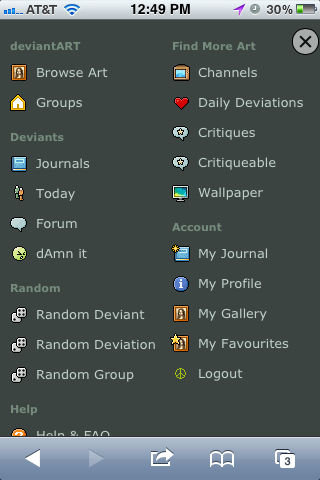
New Deviantart Mobile Site  Navigation By Danlev-d by $wreckling

  • You can find wallpapers for your phone using the "Wallpaper" app available in the main menu!
  • The Message Center is all located in one place, which makes responding to comments and browsing art and Journals an easier experience. In addition, for users who like to view their Message Center one section at a time, you can tap on the arrow next to Messages, which will prompt the Message Center's left sidebar to appear and allow you to select one section of the Message Center to view at a time.
New Deviantart Mobile Site  Message Center By Danl by $wreckling

Try it out!


The new mobile site has now been released to all beta testers, so you can try it out by simply logging into deviantART on your phone! 

Reporting Problems


We're still polishing up the mobile site. There are some bugs and minor interface issues that we're currently aware of, but we wanted to get Beta Tester feedback as we continue to improve it. If you encounter issues, be sure to report them! Any bugs encountered can be filed in the #devBUG Issue Tracker under the Mobile project.


:iconwreckling:
DeviantART is excited to launch a brand new mobile site, and we'd like Beta Testers to give it a try first!
Add a Comment:
 
:iconlinkshetaliansheikah:
I am using the Microsoft Windows 8 phone, and when I try to log on, and it refuses to let me. Oh, and there is no option for me to go back to the old site. When I manage to get there via a lot of work on google, though, it immediately reverts to the new site.
Reply
:iconlinkshetaliansheikah:
Oh; I got the logging in problem. Dunno what I did, but it (obviously) worked.
Reply
:iconnaomibezarius:
Im also using the same, and i have problems too. I can't go back to the old site, and i dont know how to browse for specific art, there is no search bar, or at least i cant find it
Reply
:iconlinkshetaliansheikah:
After much fooling around, I managed to solve my problems - but I shouldn't have had to go in such circles. I managed to log on when I tried go comment and it made me sign in (it only worked then), which solved my first problem. Then I somehow backtracked enough to fool my phone and managed to get to a regular page. Somehow I found the "switch to other site" on that page, and so now I'm back onto the original site. I shouldn't have had to backtrack like that and go through cats paws to get here, and I can't even replicate what I did, but at LEAST I managed to get back to the familiar format.
Reply
:iconnaomibezarius:
woah, how have you done it? good question. i'm still trying, 'couse i don't like any of the new site, but i can't go back to the old one... and the phone has lots of tricks itself :S
Reply
:iconlimitlessassky:
=LimitlessAsSky Apr 1, 2013  Student Filmographer
Using the opera mini 7.1 for java. cannot send notes, just refreshes the page when i click send, and does nothing. if i want to send a note, have to go to desktop version (in same browser). or old mobile version
deviantART muro drawing Comment Drawing
Reply
:iconlimitlessassky:
=LimitlessAsSky Apr 1, 2013  Student Filmographer
Ignore the muro drawing. clicked wrong button.
deviantART muro drawing Comment Drawing
Reply
:iconmegantherandom:
~MegantheRandom Mar 28, 2013  Hobbyist Traditional Artist
The "switch back to old mobile" thing won't stop bothering me no matter how many times I close it
Reply
:iconman303:
~Man303 Feb 25, 2013  New member
I'm on my iPod and I can't switch to the mobile site
Reply
:iconwreckling:
$wreckling Feb 26, 2013   Writer
Going to m.deviantart.com should launch the mobile site on your iPod. :)
Reply
Add a Comment: